30 seconds
I set the spec. I review the result. I own it.
Most of my code is written with AI. Four habits carry that.
- Context that stays true for months goes into files, not into the chat.
- Every project has one entry file.
- Each task gets the files it needs, picked by hand. Never everything.
- Review in stages, then continue.
The conversation
Naming the water.
The wallpaper's pond ripples wherever a mask says water. The mask was wrong at the edges, and I could not say where. One rule later every region had a name, and the animation did not change until it did.
- The ask
Preview updated. The lamp you circled and the area around it stay still; open water moves half again as much at the same speed. Pixel checks pass by day and by night.
Basically good. But can you handle all of the water precisely? Can you draw the boundaries clearly, like painting in Photoshop?
Yes, like tracing with the pen tool: the visible water as a fine mask, with railings, posts, lamps, rocks and plants cut out and your protected area kept. I suggest doing the boundaries first and showing you a translucent colored overlay of what moves and what stays. The animation gets the mask only after you confirm.
- Half a step
Let's do half a step. You draw the boundaries, I confirm by hand.
This round draws only the water regions for you to confirm. Cyan: proposed moving water. Red: lamps, railings, plants, kept fixed. Yellow: edges I am not sure about. Day and night, with zoomed details. No animation changes.
Go.
Done. Open the confirmation page. Screenshot and circle problems, or give me region numbers. The animation is untouched.
Water regions · confirmation draftCyan, red and yellow over the painting. Day and night, three zooms.Open the page- Eight circles
I marked every region. Some are missing, some are too much. Does this help?
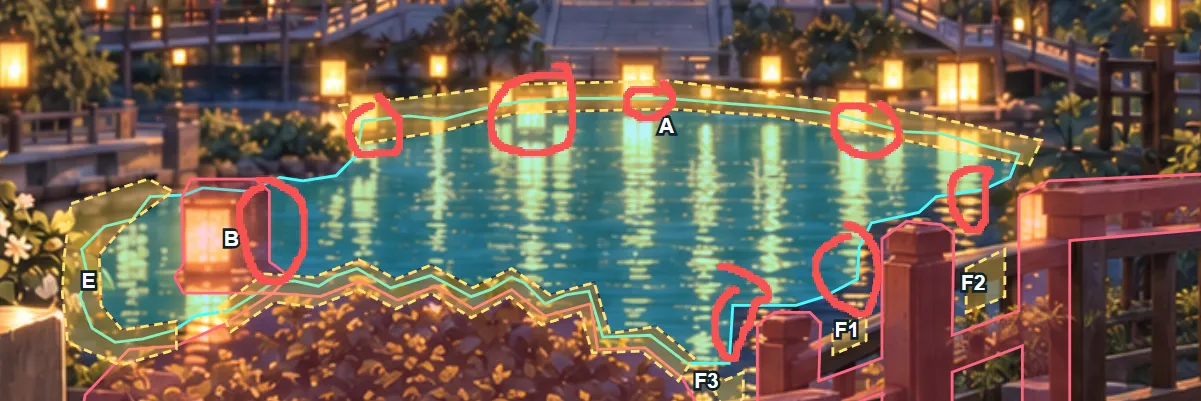
It helps: it shows which edges to recheck, and that my first pass was not tight enough. One thing is missing. A red circle does not say whether water was missed or a solid was included, and on the far shore the lamps, their reflections and the bank sit very close. I do not want to guess. No need to redraw: left to right, write add or remove per circle, or give me one rule.
- One rule
Red means it may ripple. Black means remove it. Now?
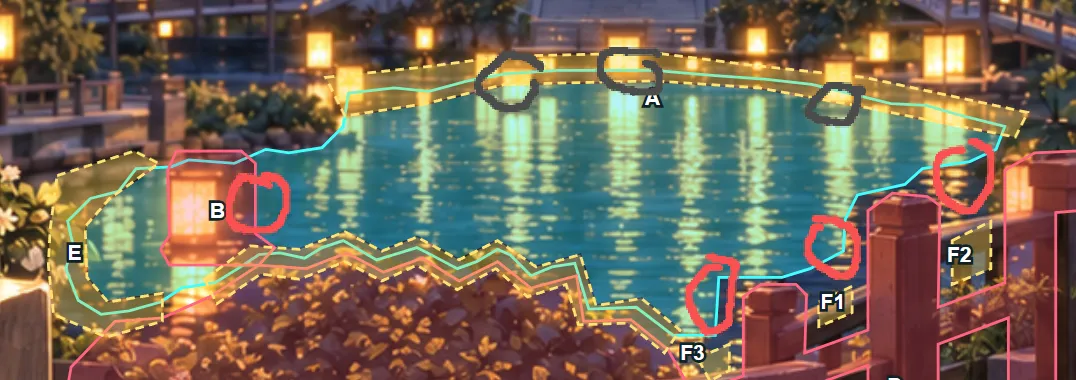
Clear now. Red circles: add as water, including right of B and near the railing. Black circles: remove from the dynamic range. B's lamp stays fixed; only the water right of it is added. I will revise the overlay, still without touching the animation.
Good. Draw another version aligned to my marks. Go ahead.
- Named regions
Second draft. R1 to R4 added per the red circles, K1 to K3 removed per the black ones, B fixed with the water to its right added. Day and night overlays and zooms updated. The animation is unchanged. Check these seven spots.
Water regions · second draftR1 to R4 added, K1 to K3 removed, B fixed. Every change has a name.Open the pageGood, I am satisfied. Add the motion and let's see.
- Into the shader
The confirmed regions are in the animation. R1 to R4 ripple; B, K1 to K3, plants and railings stay fixed; open water keeps its amplitude and fades near the edges. Pixel checks pass by day and night.
Condensed and translated from the original session. The two pages are the ones the model built that night, in English.
The tool did not need to be right the first time. It only needed to make the errors nameable.
Decision
I had the model build a confirmation page first, instead of changing the animation.
Because importing my wrong understanding would take about 5 minutes and at least 10 to undo. The first page took 7 minutes, the revision 2.5.
Cost: one extra round of confirmation. After eight circles had failed, a wrong edit was a certain cost, not a risk.
The workspace
Context is picked, not poured.
A fiction workspace, marked file by file: does the assistant read it. Press play to watch the order it reads for one task. Click any file for what it is.
- Must read
- Read if the task needs it
- Skipped
- Written, never read
novel/
- 01_background.mdBackground.
- 02_story.mdThe story.
- 03_guide.mdHow the work is organized.
- writing_rules.mdProse rules.
- volume_outline.mdThe current volume, with the chapter plan.
- leads.mdOnly the people this chapter needs.
- writes draft.mdWrites the draft. prose.md stays untouched.
One more rule from this workspace: I write comments with // inside any file. The assistant searches for them before it starts, handles each one, and deletes it. Feedback goes where the problem is, not into a message describing where the problem is. The conversation above is the same principle.
Before and after
v1 gave every chapter three files, under five layers: roles, shared rules, startup material, materials, tentative ideas. After a few months, keeping the structure cost more than the context it saved. v2 cuts a chapter to two files and moves chapter design into the volume outline.
Before · v1, July 2026
01_story/volume_02/chapter_001/
- character_reasoning.md
- chapter_outline.md
- prose.md
After · v2, October 2026
01_story/volume_01/chapter_001/
- draft.md
- prose.md